
CRM Reporting
CRM Reporting provides a detailed overview of all key system-level activities performed within the CRM—whether in Salesforce, HubSpot, or Microsoft Dynamics 365. It captures and reports on actions …
CRM Activity Logs Overview
CRM Reporting provides a detailed overview of all key system-level activities performed within the CRM—whether in Salesforce, HubSpot, or Microsoft Dynamics 365. It captures and reports on actions such as user authentications, creation and updates of activities, and modifications to core entities like Contacts, Accounts, Leads, and more. These logs offer full visibility into user interactions and system changes, supporting operational transparency, auditing, and performance monitoring.
Summary Statistics
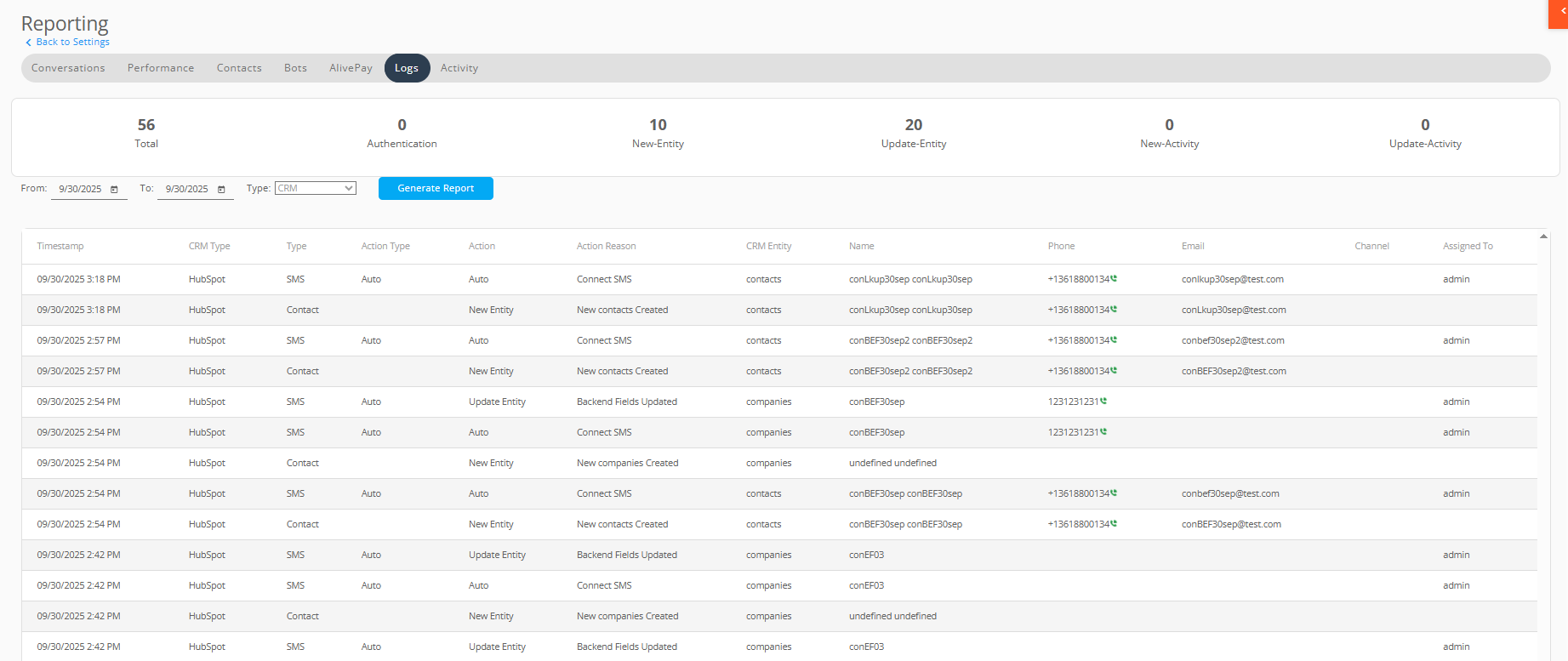
At the top, the system displays a summary count of activity types within the selected date range:
- Total: Total number of log events recorded
- Authentication: Login/logout events
- New-Entity: Creation of CRM records (e.g., new companies, contacts)
- Update-Entity: Modifications to existing CRM records (e.g., updating values using backend fields)
- New-Activity: Creation of activities such as SMS, or Live Chat
- Update-Activity: Updates to those activities (e.g., appending incoming or outgoing messages)
Filtering Options
Users can narrow down the displayed logs using the following filters:
- Date Range (From and To): View logs within a specific time frame to analyze recent activity or investigate past events.
- Type: Select the type as CRM.
These filters help users quickly locate specific events and analyze activity trends within defined parameters.
Understanding the Log Table
Each log entry provides the following details:
- Timestamp: Exact time when action occurred
- CRM Type: The CRM platform involved (e.g., HubSpot)
- Type: Mentions the communication module through which activity or entity-related action is initiated
| Type | Description |
|---|---|
| SMS | activity initiated through SMS or the live chat module |
| Live Chat | activity initiated via live chat module |
| Contact | action initiated through contacts section |
- Action Type: It refers to the mode/phase that triggered the connectivity/updation of activity in CRM
| Action Type | Description | |
|---|---|---|
| Manual | The phase during which a record is manually tagged, enabling all subsequent incoming SMS messages to be automatically associated with that tagged record. | |
| Auto | The mode in which a record is automatically tagged when a record is created. | |
| Auto Phase 1 | This phase is triggered when the Auto SMS feature is enabled and a new SMS—either inbound or outbound—enters the system for the first time. Record is automatically tagged. | |
| Auto Phase 2 | When the Auto SMS feature is activated, this phase ensures that any future messages from an existing Alive5 contact are automatically linked to the corresponding CRM record. (Has not been connected to the CRM) |
- Action: Action performed (e.g., Update Entity, Update Activity)
| Action | Description |
|---|---|
| New Entity | When a new record is created in the external CRM |
| Update Entity | When already existing record is updated in the external CRM |
| New Activity | When SMS or Live Chat is connected to some record in CRM |
| Update Activity | When new incoming or outgoing SMS from existing contact is appended to corresponding activity in the CRM |
- Action Reason: A short description indicating the explicit cause or reason behind the recorded action
- Thread Id: A unique identifier assigned to a conversation or process thread. Useful for tracing specific interactions
- CRM Entity: The type of object involved (e.g., companies)
- Name, Phone, Email: Identifying details of the entity (if available)
- Channel: Communication channel involved for SMS and Live Chat
- Assigned To: The user or system account that performed the action
Permissions & Access
All users have access to the Reporting section by default.