

Opt-in Compliance
Always obtain explicit permission before sending text messages to contacts—this is called opt-in compliance. Document when and how you received this consent, as these records will be essential if a…
Always obtain explicit permission before sending text messages to contacts—this is called opt-in compliance. Document when and how you received this consent, as these records will be essential if any disputes arise later.
It involves the contact explicitly agreeing to receive marketing messages. For example, a customer manually checking a box on a form stating, "I agree to receive promotional SMS messages”. See our “4 Examples of Opt-In Consent” section below.
4 Examples of Opt-In Consent
Here are the 4 ways to obtain opt-in consent: website form, verbal, customer texting in, and paper/digital document.
1. Website Form
During your user registration process, including an acknowledgement section with a checkbox to allow the contact to agree to receiving texts from your organization. This form should have an input for the user’s mobile phone number as well.
This can be delivered over these types of forms:
- Contact Us
- Registration
- Job Application
- Chatbot Flow: This can be embedded in a chat window as an option next to others ways to engage and connect.
Example:
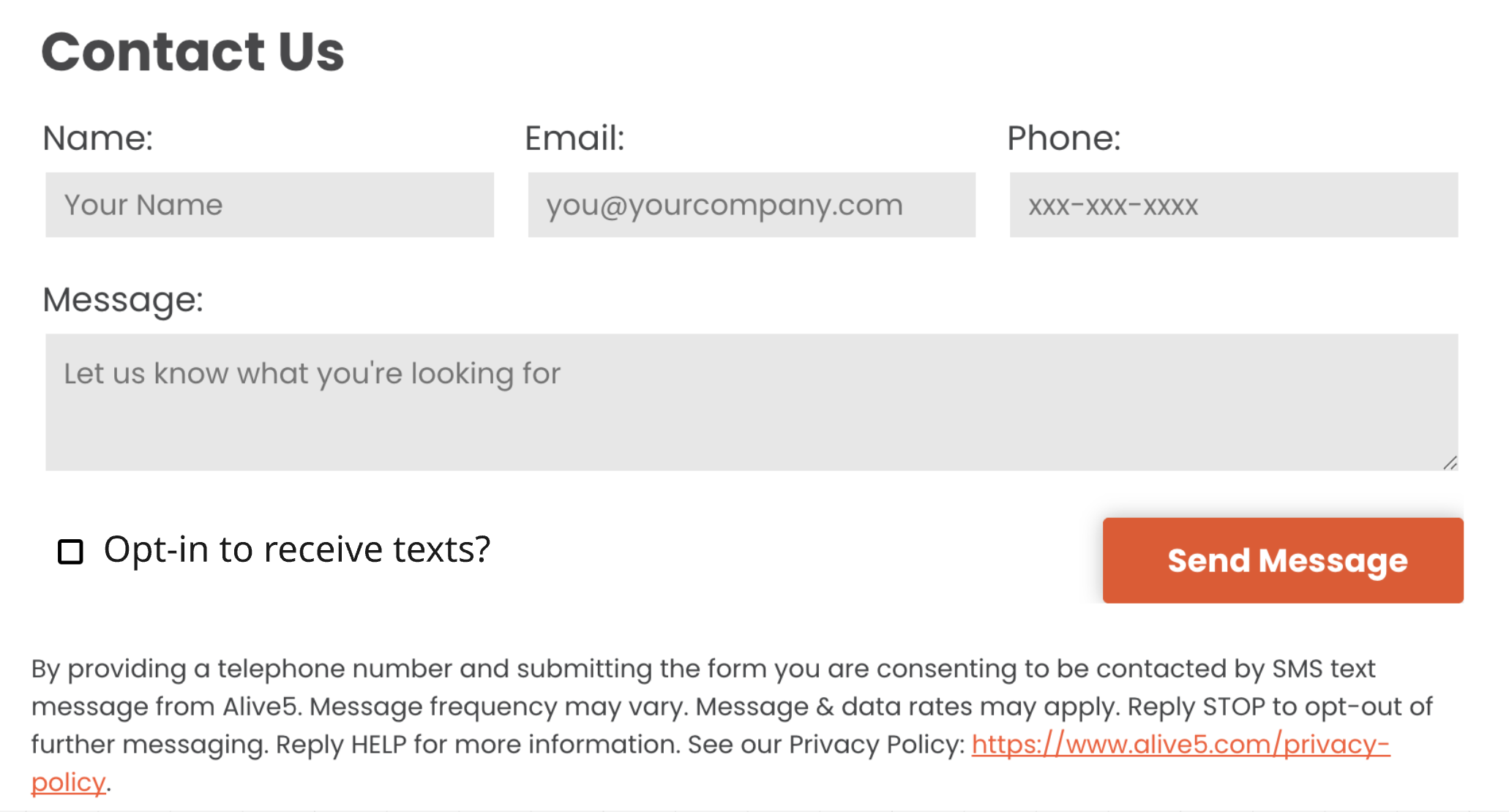
2. Verbal Confirmation
When you’re talking to someone over a phone call or Zoom meeting, you can simply ask them verbally, “Do I have your permission to text?”, or "Can I text you back at your cell number?".

TECHNICAL REQUIREMENTS
Non-Marketing Consent
- When a customer [calls or walks] in to [phone number or office address] which is published at [url or how user learns number/address] The representative explains the consent process verbally:
By providing your phone number, you agree to receive SMS [Use Case(s)] from [Brand Name]. Message frequency may vary. Standard Message and Data Rates may apply. Reply STOP to opt out. Reply HELP for help. We will not share mobile information with third parties for promotional or marketing purposes.
- Once the customer verbally agrees, the phone number is recorded, and a confirmation SMS is sent:
You have agreed to receive SMS updates from [Brand Name]. Msg freq may vary. Std msg & data rates apply. Reply STOP to opt out, HELP for help.
Marketing Consent
- A customer may call [the number] or be present in the office. An employee will present the consent process verbally:
Would you like to sign up for SMS notifications from [BRAND] so we can send you [use cases + marketing]? By providing your phone number to [BRAND] you are consenting to receive [use cases + marketing] via text messages from us. Message and data rates may apply. Message frequency may vary. You can text HELP for support or more information and STOP to unsubscribe at any time. We won't share your mobile information with third parties for marketing. You can also find our privacy policy and terms of service on our website at [URL]
- Once the customer agrees verbally, the phone number is recorded, and a confirmation SMS is sent:
[BRAND]: You have agreed to receive SMS updates. Msg frequency varies. Msg&data rates may apply. Reply STOP to unsubscribe, HELP for help. To confirm you also want to receive marketing messages please reply YES
- If user replies: YES
[BRAND] Thanks, you’ve now been subscribed to SMS notifications, including promotions from [BRAND] Msg frequency varies. Msg&data rates may apply. Reply STOP to unsubscribe or HELP for help.
- If user does NOT reply YES, they will not be opted in to promotional messaging and will only receiving informational messaging.
3. Customer Texts In
When a contact sends a text to your phone number displayed on your company website, or opts to send a text message back instead of calling back from their call log is another "natural" form of opt in. The customer wants to connect with you, and having an auto-responder to provide a single or double opt-in.
This can be delivered over:
- Print (physical flyers, brochures, business cards)
- Website
- Social Media Posts
- Broadcast (radio, television, jumbotron, etc)
Example 1: A simple call to action to text the specific keyword (”VIP”) which starts the opt-in flow, provided by Alive5’s automation:

Example 2:
A special type of QR Code can be generated which starts a text message instead of visiting a website address. When creating this QR code, your SMS number and a message is embedded which opens your mobile phone’s SMS app when scanned:

Example 3: If you are currently running an email newsletter or mailing list, incorporating content in your next campaign to opt in users is an easy way to build your SMS list quickly:

TECHNICAL REQUIREMENTS
- The [brand] provides a number (e.g., 123456789) via [a channel such as a website, flyer, or QR code, business card, email signature, etc.]
- When the user texts to the number the system responds with:
SINGLE OPT IN example:
Thank you for your message to [Brand Name]! We will be with you shortly. Msg freq may vary. Std msg & data rates apply. Reply STOP to opt out, HELP for help. We will not share or sell your mobile information for marketing/promotional purposes.
DOUBLE OPT IN (for Marketing Use Case) example:
Thank you for your message to [Brand Name]! Reply YES if you would like to receive texts from us. Msg freq may vary. Std msg & data rates apply. Reply STOP to opt out, HELP for help. We will not share or sell your mobile information for marketing/promotional purposes.
- If you have a marketing use case then marketing must be mentioned on the opt in such as "You are opting in to receive marketing SMS from [Brand Name]."
- If you have a political or charity use case and there is any fundraising or perceived as there will be fundraising then you must mention "Donations may be solicited." on the opt in.
- Link to where phone number or QR code is advertised or link to screenshot of where phone number or QR code is advertised.
- The Alive5 platform allows you to set up SINGLE and DOUBLE opt in flows via the bot flow system.
4. Paper or Digital Document (Written Permission)
Adding verbiage on any written or digital document to ask for permission to text a user can be a great opt-in method. Be sure to have a section for use to fill in their mobile number, and outline your terms of service.
This can be delivered over:
- Paper Document (onboarding, patient intake)
- PDF/E-Sign

TECHNICAL REQUIREMENTS
- The contact fills out a paper form during [appointment/onboarding/renewal/etc.] at [address] which they learn at [website/social/whatever] in which they provide their phone number and sign their consent.
- The form includes a disclaimer:
By signing this form and providing your phone number, you agree to receive SMS [Use Case(s)] from [Brand Name]. Message frequency may vary. Standard Message and Data Rates may apply. Reply STOP to opt out. Reply HELP for help. Consent is not a condition of purchase. Your mobile information will not be sold or shared with third parties for promotional or marketing purposes.
- Once the information is entered into the system, when texting the contact for the first time, include this message:
Thank you for signing up for SMS updates from [Brand Name]. Msg freq may vary. Std msg & data rates apply. Reply STOP to opt out, HELP for help.
Overview
Apply one opt-in per Brand and Campaign
A Consumer opt-in should apply only to the campaign(s) and specific Message Sender for which it was intended or obtained.
This is an important compliance point because it means:
- If someone opts in to receive promotional texts about sales, you can't use that same consent to send them texts about new product launches.
- If they opt in to one brand's messages, you can't transfer that consent to a sister company or different brand.
- Each distinct messaging campaign needs its own specific opt-in.
This rule helps protect consumers from receiving messages they didn't specifically agree to, even if they've generally consented to receive some messages from your organization. It's part of the broader principle that consent must be clear, specific, and not broadly interpreted beyond what the consumer actually agreed to receive.